
LightPDF is a free service offering various online PDF tools, primarily divided into three main functions: conversion, PDF generation, and PDF-related utilities. While similar web services abound, its standout feature is enabling users to complete most tasks directly within their browser—no additional downloads or software installations required. This proves especially useful for quickly resolving various last-minute issues!
Recently, LightPDF rolled out a series of powerful new feature updates, focusing heavily on the currently trending AI technology. The new “AI Watermark Removal” tool uses artificial intelligence to automatically and quickly eliminate watermarks from images or PDF documents. Whether it's text, logos, objects, or images, removal is effortless without needing to learn complex graphic software. The results are excellent, preserving the original image resolution and quality.
For more complex or stubborn watermarks that can't be automatically removed, LightPDF also offers a “Manual Removal” mode. Use the selection tools—such as the box, brush, and lasso—to outline the area you want removed. This allows the AI to perform more detailed adjustments and processing. LightPDF's watermark removal tool supports multiple image formats including JPG, JPEG, PNG, BMP, and HEIC. Uploaded images are automatically deleted from servers within 24 hours, maximizing user privacy and security.
How to Remove Watermarks Using LightPDF AI?
1. Upload your image or PDF file.
After entering LightPDF's online AI watermark removal tool, simply drag and drop your image onto the website to upload. All image formats are supported.
2. Select the removal mode.
After uploading, your image will appear in the LightPDF editor. This service supports batch editing, allowing you to process multiple images at once.
The default removal mode in the top-right corner is “Auto Remove.” Without any settings or manual steps, simply click “Remove” to let AI detect and eliminate watermarks from your images. It effectively handles text, logos, or image-based watermarks. The process completes in just seconds with exceptional efficiency.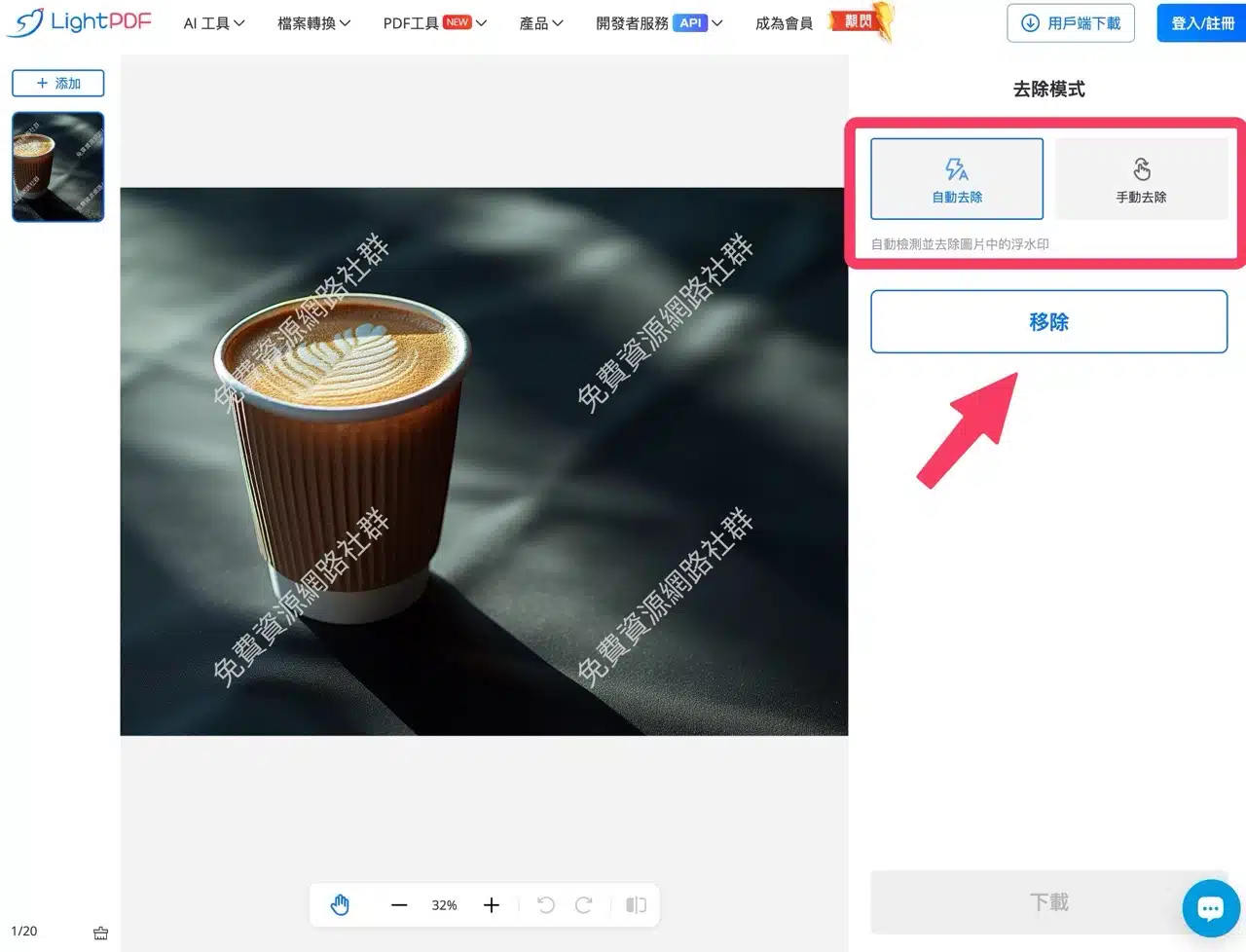 Keep the webpage open during processing.
3. Download the processed image.
A preview of the removed watermark will appear. Click “Download” in the bottom-right corner and log in to your account to save the image.

4. Manual Removal (Optional if needed).
If the AI fails to accurately detect the watermark's location or the results are unsatisfactory, you can select the “Manual Removal” option in the removal mode. Follow the instructions: if watermarks remain after automatic removal, use this feature to further eliminate them from the image.
After selection, three tools appear: Rectangular Lasso, Freehand Lasso, and Brush. Use these to manually mark the remaining watermark area.
After marking, click “Remove” to let AI recognize and clear the marked area.
5. Log in to your account and download the image.
After using LightPDF to remove watermarks from images or PDFs, you must log in to download the file. Fortunately, you can log in directly using accounts like Google or Facebook. Once logged in, you can download without restrictions. At the time of writing this article, LightPDF's free plan has no usage limits for AI-powered image watermark removal.